Menu:

Help center Add the web platform to the Android home screen Web platform on Android

Add the web platform to the Android home screen

Learn how to add CaravanFX to your Android home screen.
How to add the web platform to your home screen Open the CaravanFX web platform in Chrome and follow the steps below.
1
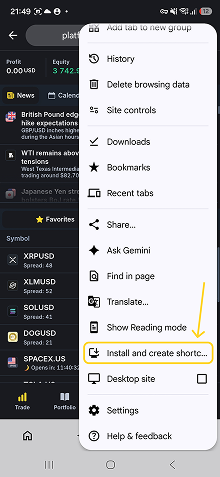
Open the Chrome menu

Tap the three-dot menu in the top-right corner of the Chrome screen.
2
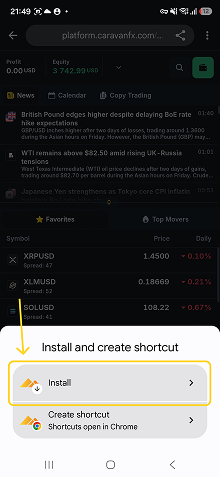
Select Install

Tap Install and create shortcut, then select Install.
3
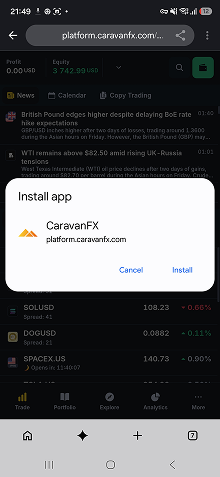
Install the web platform

Tap Install to confirm. The CaravanFX icon will appear on your home screen.
Can’t find the answer you need?

Our support team is ready to assist you. We’re here 24/7 to guides.

Contact support


Important notice:
CaravanFX does not provide services to residents or citizens of certain restricted jurisdictions, including the United States, Canada, North Korea, Iran, Cuba, Russia, and Myanmar.
If you believe this restriction was applied incorrectly, please confirm your status below to continue browsing the website.
Scan the QR code
to download the app
QR code